This Quarter in Venus Control Suite: Stay Informed, Stay Ahead
We’re excited to introduce a new way to keep you up to date. Each quarter, we'll round up a list of new, key enhancements in Venus Control Suite. These highlights give you a quick overview of what’s new, what’s possible, and what you might not know about, yet!
David Grotzinger on 12/8/2025
Categories: Venus Control Suite Training

What's New?
Web Editor Enhancements
Designing content in the Web Editor is now smoother and smarter. We’ve introduced several new tools to help you create polished content with less effort:

Advanced Search for Display Picker
Managing large display networks can feel overwhelming, but not anymore! The new Advanced Search for Display Picker makes it easy to find the exact list of displays you need, even in massive groups.
If you already track display assignments in Excel, you can now copy and paste that list directly into the “advanced search” bar. Instantly, the Display Picker narrows down to only those displays, saving you countless clicks. You can also enter multiple search terms at once and toggle between exact or partial matches, giving you flexibility to work the way you want.
- Paste lists directly from Excel to filter displays
- Search dozens or hundreds of displays at once
- Switch between exact or partial matches for precision
Visual Cues Playlist Content
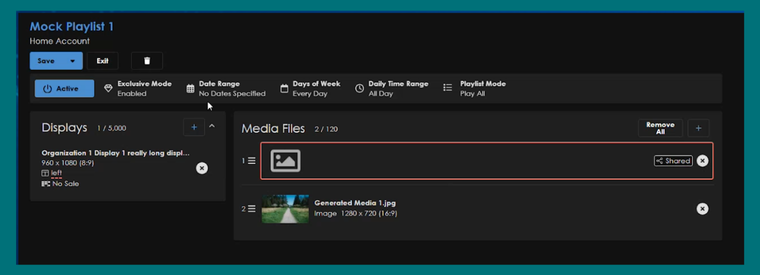
Playlists are the heartbeat of your display strategy, and understanding where issues can arise is critical. We’ve added visual cues that highlight deleted or missing media, so you can spot issues instantly. If you have any old playlists that might contain deleted media files, review and look out for the red highlights!
Did you Know?
Countdowns - Available in All Packages

Countdowns are a simple but powerful way to capture attention and build anticipation. With the Countdowns feature available to all VCS packages in the Web Editor, you can create custom timers for any big moment! From New Year’s Eve celebrations to Grand Openings or special community events. Just set your date and time, adjust it to the canvas, and let your displays do the work of generating excitement as the clock ticks down.
Data Studio Calendar and Sheets - Available in Professional or Enterprise
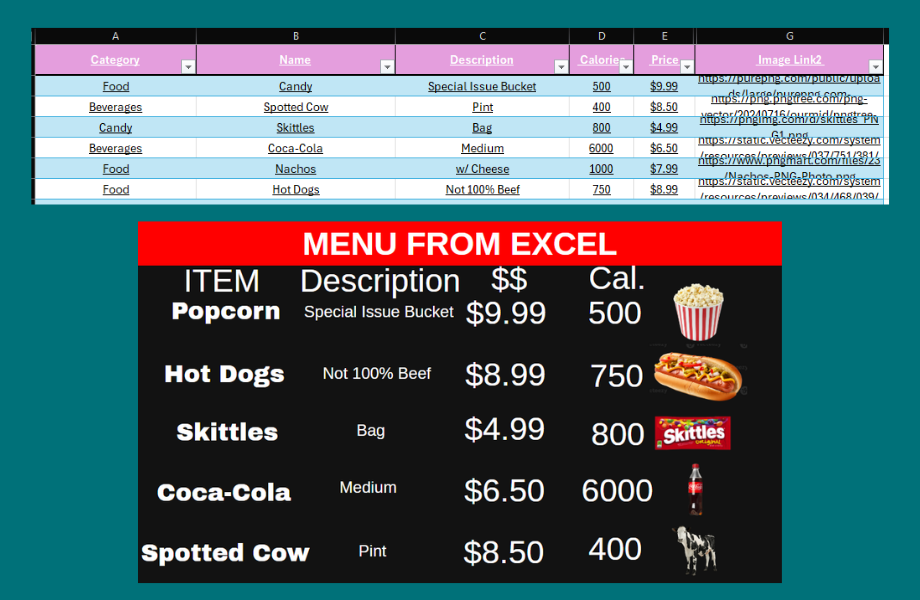
Your calendar, Excel, or Google Sheets can now power your displays automatically. With the new Data Studio Cloud source integration, you can connect your existing Microsoft or Google calendars directly to Venus. This means your calendar entries can populate content on the web presentation canvas based on the date range you choose and the details you want to display.
Learn How to Integrate Cloud Drive Sources to your Display
It’s a seamless way to automate information for spaces where schedules matter most. Meeting rooms can show what’s coming up next, schools can broadcast daily announcements, and organizations can keep everyone informed without manual updates. Just link your calendar, set your preferences, and let your displays keep pace with your schedule.
Explore Features from other Packages!
Curious about what else Venus Control Suite has to offer? Compare features across packages to find the best fit for your organization.
Wrapping Up
These quarterly highlights showcase just a few of the ways Venus Control Suite is evolving to make your display management smarter and more engaging. From playlist clarity to advanced search tools, to design enhancements and security monitoring, we’re focused on giving you more control and confidence every time you log in.